

Hostbill Module
Before configuring the Hostbill Module make sure you have obtained an API Key (token) first.
The HostBill module we provide includes the following features:
- Register
- Transfer
- Renew
- Update Nameservers
- Update Whois
- Get EPP Code
- Register Nameservers
- DNS Record Management
Minimum Requirements
- Latest Hostbill version
- PHP 7.4 or later
Download Hostbill Module
- Login RDASH.
- Click menu Settings.
- Click tab API & Modules.
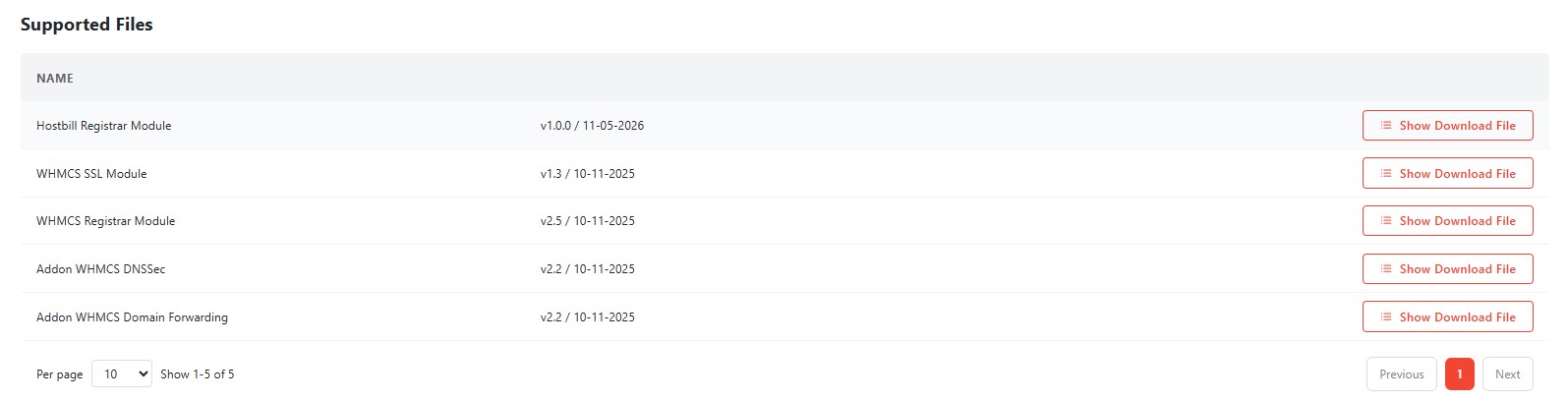
- To download the module, click the Download icon as shown in the example image below.
Configuring The Registrar Module (Hostbill)
- Copy the contents of the
hostbill/folder (not thehostbill/folder itself) into the HostBill installation directory:[includes/modules/Domain/] - After copying/uploading, the directory structure within HostBill will be:
/path/to/hostbill/includes/modules/Domain/
├── class.rdash.php
└── rdash/
    ├── RdashClient.php
└── RdashException.php- Ensure that the web server user (e.g.,
www-data,nginx,apache, etc.) has read access to the newly added files. HostBill does not require write access. - Log in to the HostBill admin area, then go to Settings > Modules > Domain Modules.
- Locate RDASH, then click Activate.
- Configure it by clicking Manage Connections, then enter your Reseller ID and API Key.
- Once everything is correct, click Save Changes.