

WHMCS Module
Before configuring the WHMCS Module make sure you have obtained an API Key (token) first.
The WHMCS module we provide has features as shown in the image below: 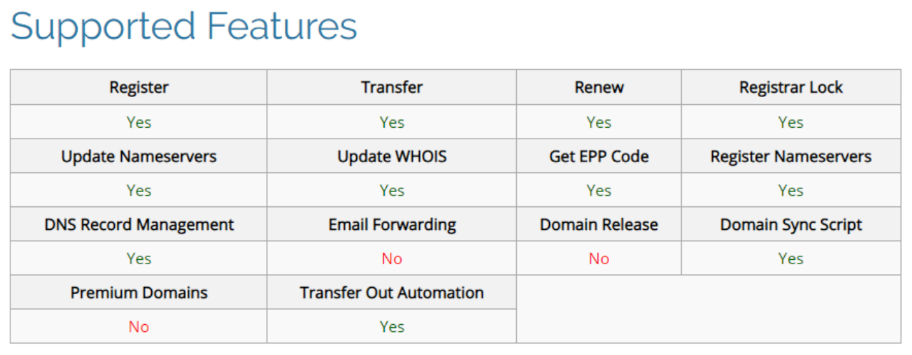
Minimum Requirements
- PHP Version 7.1 or later
- WHMCS Version 7.x or later
- ionCube Loader v10.x or later
Download WHMCS Module
- Login RDASH.
- Click Settings menu.
- Click API & Modules tab.
- To download the module, click on the Download icon as shown in the example image below.

Configuring the Registrar Module (WHMCS):
- Extract the downloaded Registrar Module file into the directory [WHMCSROOT]/modules/registrars/
- Ensure that the rdash.php file is located [WHMCSROOT]/modules/registrars/RDASH/RDASH.php
- Login to the WHMCS admin area, then click on System Settings and select Domain Registrars.
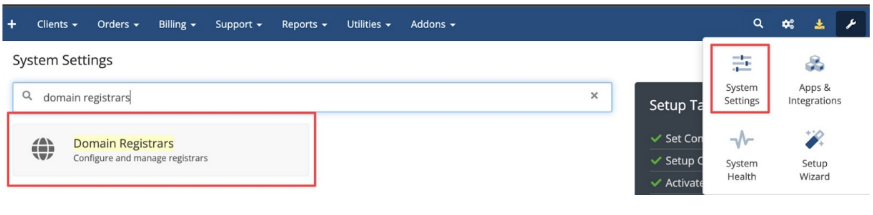
- You will see a list of Registrar Modules, select RDASH and click on Activate.

- Configure the module by clicking on Configure, then enter the API URL (fill with api.rdash.id/v1), Reseller ID, and API Key. If you are using a trial version of the RDASH, check the Sandbox option.
- Once everything is set, click on Save Changes.